Best AI Avatar Generators From a Photo in 2026
The best AI avatar generators from a photo in 2026, split into still avatars and talking video avatars. What each costs, and how to tell a result is really you.
By Yuvraj Singh·Founder, Leaxor

One selfie in, one profile photo out
The AI headshot generator works from a single photo, with no training step. Free runs daily with an account.
Sources linked throughoutClaims checked against vendor docsReviewed September 2026
Short version: "AI avatar from a photo" means two different products, and which of the best AI avatar generators suits you depends on which one you want. If you want a talking video avatar, HeyGen is the pick, and it makes one from a single photo on its free plan. If you want still avatars for a profile picture, tools that train on a batch of selfies (Photo AI, Lensa) give the most styles, and single-photo editors give you one good result fast.
Most lists online mix the two, so you end up comparing a lip-sync video platform to a profile picture app on price. Pick your type first. Then read the section on checking results, because that's where my own testing comes in.
Quick pick: best AI avatar generators from a photo
| You want | Tool | Photos needed | Price |
|---|---|---|---|
| A talking video of you | HeyGen | 1 | Free (3 videos / month), Creator $29 / month |
| A talking photo, simpler | D-ID | 1 | Paid plans, check pricing |
| Many styled avatars of you | Photo AI | A selfie set | From $19 / month |
| A pack of stylised avatars | Lensa Magic Avatars | 10–20 | In-app packs |
| A professional headshot | Aragon | A selfie set | One-time, ~$35–$75 |
| One styled photo, from one selfie | Leaxor photo tools | 1 | Free with an account, then 2 credits ($0.20) |
Still avatars vs talking video avatars
A still avatar is an image. Profile picture, Discord icon, LinkedIn photo, a stylised portrait for a channel banner.
A talking avatar is a video. Your face, or a version of it, delivering a script with lip-sync. It's a presenter, not a picture, and the tools that make one are priced like video platforms, by minutes and credits.
Within still avatars there's one more split that decides how much work you put in. Training tools take a set of selfies, build a model of your face, then generate as many styles as you like. Single-photo editors take one photo and one instruction and return one image. Training costs you an upload session and a wait. Editing costs you a reroll when a run misses.
How to check an avatar is actually you
On 28 August I tested models for a face swap tool, using two portraits of people who don't exist, generated for the test so no real person's photo went to a provider. Two of the models returned a success code and a good-looking portrait without doing the job. One gave me the second image back lightly retouched and called it done, after 28 seconds. Another returned the first input unchanged in 13 seconds. The model I ended up shipping did the swap properly, and it took 43.8 seconds.
Then in mid-September I ran a 1985 photo prompt three times on one synthetic selfie. All three kept the face: eyes, brows, freckles and smile, no skin smoothing. But the second run left a smartphone in her hand even though the prompt said no phones, and the third turned a few strands of hair into feathers.
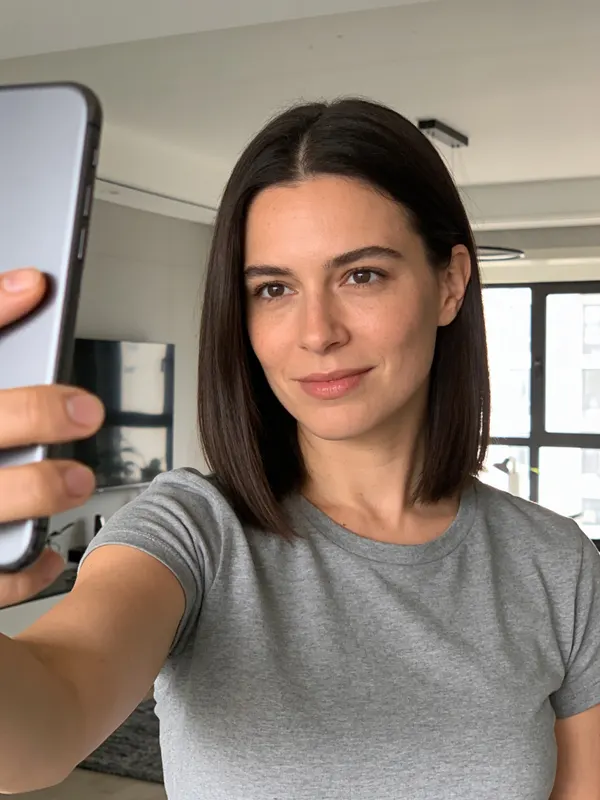
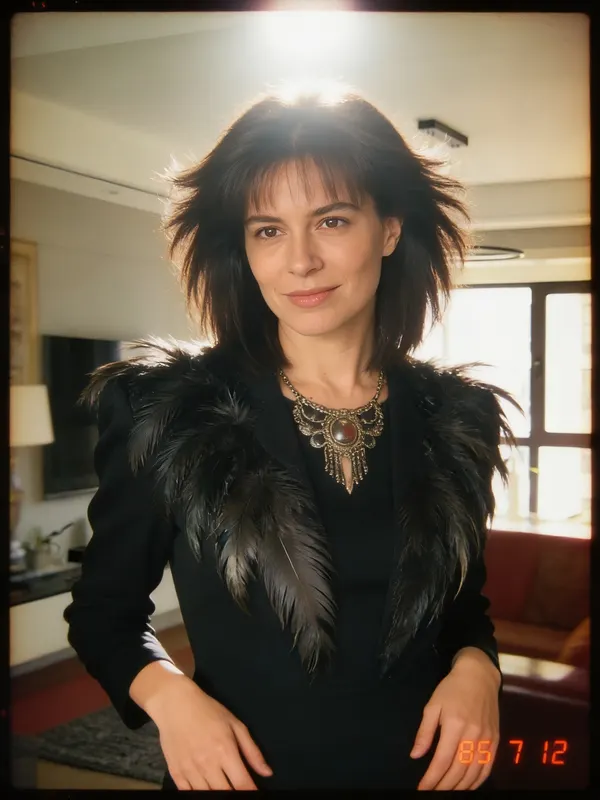
So a result that looks great can still be wrong in ways you'll only see side by side. Before you set an avatar as your profile picture:
- Put it next to the original photo at the same size.
- Check the features that make a face yours: eye shape, brows, nose, the line of the smile, any marks or freckles.
- Look for smoothing. Airbrushed skin is one of the quickest ways a face drifts into a stranger's.
- Check hands and edges, where leftover objects and odd artefacts hide.
AI avatar generator from photo: the tools, by type
1. HeyGen: best for talking avatars
Who it's for. Anyone who wants a video presenter made from their face. HeyGen's pricing page lists photo avatars on every plan, up to 3 on the free plan and unlimited on paid ones.
Setup friction. One photo for a photo avatar. A custom video avatar, the more realistic kind, needs a recording of you.
Hidden costs. The free plan is a trial in disguise: 3 videos a month, each capped at one minute. Creator is $29 a month with 600 credits and videos up to 30 minutes, and Pro is $49. If you'd publish more than a few short clips a month, budget for Creator from day one. I've compared the wider trade-offs in HeyGen alternatives.
2. D-ID: a simpler talking photo
Who it's for. People who want a photo to speak and don't need a full avatar studio. D-ID animates a single image into a talking video.
Setup friction. Low.
Hidden costs. I couldn't read plan prices off D-ID's pricing page when I checked, so I'm not quoting any. Look before you build a workflow on it.
3. Photo AI: best for lots of still styles
Who it's for. Someone who wants dozens of photos of themselves in different settings. You upload selfies, Photo AI builds a model of you, and you generate from there. Plans start at $19 a month.
Setup friction. The upload set. A training tool is only as good as the variety you give it.
Hidden costs. It's a subscription for a job most people do once, so cancel when you have your photos. Commercial use needs the Pro plan or above; Starter is personal use only.
4. Lensa Magic Avatars: stylised packs
Who it's for. People after illustrated and fantasy styles more than photoreal ones. Magic Avatars ask for 10 to 20 close-up selfies with different angles and expressions, and no sunglasses or hats.
Setup friction. Choosing those selfies, on a phone, in the app.
Hidden costs. Packs are bought in-app, and the price depends on your store and region. Lensa alternatives covers where else to go if the art styles aren't what you want.
5. Aragon: when the avatar is a headshot
Who it's for. Anyone whose "avatar" is really a professional headshot for LinkedIn or a team page. Aragon trains on your selfies and charges once, roughly $35 to $75 depending on tier, with frequent discounts. I went through the per-photo maths in what Aragon AI really costs.
Setup friction. A varied selfie set, then a wait of up to about two hours on the cheapest tier.
Hidden costs. No free trial, so you pay before you know whether your face generates well.
6. Leaxor photo tools: one selfie, one styled photo
Quick flag: Leaxor is mine, so read this one knowing that.
Who it's for. Someone who wants a single good result from a single photo, without training anything. The 80s AI photo generator turns a selfie into a photo that looks taken in 1985. The AI headshot generator turns one into a clean corporate headshot.
Setup friction. A free account (guest sessions don't count) and one photo.
Hidden costs. The 80s tool gives 3 free photos per account, then charges 2 credits, which is $0.20 a photo. The headshot tool gives free runs daily with an account. A 1985 photo measured 28.8 to 31.5 seconds on a normal-sized upload. The headshot edit ran 16 to 18 seconds.
What it won't do is build you a presenter. Lip Sync mode will make a photo you supply speak, using sync. 3 Avatar, but there's no avatar library, no templates and no dubbing, so for a presenter-led video use HeyGen.
One thing I learned building it. The first 1985 run came back as a 2048-pixel square and reframed a portrait selfie to fit. The fix was a setting that keeps the upload's shape. And when I told it to swap a phone for a film camera, it put a camera into every one of twenty style previews, because nearly every upload is a selfie. If an avatar tool keeps giving you the same odd pose or prop, that's often the reason: something in its fixed prompt is being applied to every photo.
Is there a free AI avatar generator from a photo with no sign-up?
It's a popular search, and I'd be sceptical of anything that answers yes. Each run costs the provider real compute, so a tool with no account and no limits is either very limited, watermarked, or paying for your avatar some other way. The honest free options need an account: HeyGen's free plan, and Leaxor's free photos. The cost of saying no to sign-up is the privacy question, and your face is the thing being uploaded.
What I'd pick
Talking avatar: HeyGen, start free, move to Creator only once you're publishing weekly. A pile of still avatars in many styles: a training tool, and pick by art style rather than by price. One profile photo: try a single-photo tool first, since it costs a selfie and thirty seconds. If you want to write your own instructions instead, these AI photo prompts use the same face-keeping structure as my tools, and they work in Gemini or ChatGPT.
Frequently asked questions
What is the best AI avatar generator from a photo?+
It depends which kind of avatar you mean. For a talking video avatar made from one photo, HeyGen is the most complete option and its free plan includes up to 3 photo avatars. For still profile avatars in many styles, tools that train on 10 to 20 selfies, like Photo AI and Lensa, give the most variety. For one styled photo from one selfie, a single-photo editor is faster.
Is there a free AI avatar generator from a photo?+
Yes, with limits. HeyGen's free plan includes up to 3 photo avatars and 3 videos a month, each capped at one minute. Leaxor's 80s AI photo generator gives 3 free photos per account, and its headshot generator gives free runs daily, both with a free account. Almost nothing worth using is free without an account, because every run costs the provider real compute.
How many photos do I need to make an AI avatar?+
One, for single-photo editors and for talking photo avatars like HeyGen's. Training-based tools want more: Lensa's Magic Avatars ask for 10 to 20 close-up selfies with varied angles and expressions, and no sunglasses or hats. More photos buys consistency across many styles, not a better single image.
Can I make a talking avatar from a photo?+
Yes. HeyGen and D-ID both animate a single photo into a talking video with lip-sync. HeyGen's free plan allows 3 videos a month up to one minute each, and its Creator plan is $29 a month. Leaxor's Lip Sync mode can make one photo talk through sync. 3 Avatar, but it has no avatar library or presenter templates, so for a full avatar studio HeyGen is the better fit.
Why doesn't my AI avatar look like me?+
Usually the input or the model. A clear, front-facing, well-lit photo with nothing covering the face gives any tool the best chance. Some models also fail quietly. In my own tests, two face-editing models returned a good-looking portrait and a success code without doing the job at all, so compare the result to your original side by side before you use it.
Are AI avatar generators safe for my photos?+
Read each tool's privacy policy for how long uploads are kept, because it varies. Training-based tools build a model of your face, which is a bigger thing to hand over than a single edit. Leaxor's photo tools send the image to its processing provider, fal, for that one job and don't keep it afterwards.
One selfie in, one profile photo out
The AI headshot generator works from a single photo, with no training step. Free runs daily with an account.
Try the headshot generatorYuvraj SinghFounder, Leaxor
Built Leaxor, an all-in-one AI image and video generator, to kill the two bottlenecks in publishing: 3–5 hours per short, and a second tool for every thumbnail. Now both take minutes.