AI Photo Prompts for Women: 20 Built to Keep Your Face
20 copy-paste AI photo prompts for women for Gemini and ChatGPT: saree, retro, headshots, travel and more, built on a face-keeping block from a tested prompt.
By Yuvraj Singh·Founder, Leaxor

Skip the prompt for the 1985 look
Upload a selfie and the 80s AI photo generator runs the full tested prompt. Your first 3 photos are free with an account, then 1 credit each.
Sources linked throughoutClaims checked against vendor docsReviewed September 2026
Short version: the AI photo prompts for women below are 20 copy-paste prompts for Gemini or ChatGPT. Upload your photo, paste the face-keeping block first, then one scene. That block matters more than any scene you pick. Without it, you get a nice photo of someone who looks a bit like your cousin.
Here's what I can and can't back up. I adapted the face-keeping block for a tool I built, and ran its 1985 prompt on a synthetic test face three times, with notes on what broke. The other nineteen scenes use the same structure, but I haven't run them. Treat them as strong starting points, not guarantees.
Step 1: paste this face-keeping block first
Use the photo I uploaded. Keep my face, facial structure, skin tone, eye colour, age and identity fully recognisable. Do not change my facial features, do not smooth or beautify my skin, and do not alter my body proportions. If I'm holding a phone, remove it completely and re-pose my hands naturally for the scene. Keep the photo realistic, with no added text, captions or watermarks.
You'll rarely need to copy it on its own. Copy prompt on every card below puts this block in front of the scene for you, so one paste is the whole message. Scene only is for when the block is already in your chat.
Why the order matters (what my tests showed)
Four things I learned from running the 1985 version, all recorded when I built the tool:
- Identity goes first. I took the order (face, then hair and clothes, then photo style, then setting) from explainx.ai's version of the prompt, which they tested on ChatGPT and Nano Banana, because earlier instructions carry more weight. My three runs kept the eyes, brows, freckles and smile, with no smoothing.
- "No phones" isn't enough. The second run kept a smartphone in her hand even though the prompt said no phones. It only went away once the prompt named the phone outright.
- But whatever you name, it copies. When I told it to swap the phone for a film camera, a camera turned up in every one of twenty style previews, because nearly every upload is a selfie. So the block above says remove the phone and re-pose, and names nothing to replace it.
- Watch the frame. One run came back as a square and cropped a portrait selfie to fit. In Gemini or ChatGPT, add "keep the original aspect ratio" if yours gets cropped.
Three runs is a small sample, one per variant. It was enough to catch those failures, not enough to promise they never happen.
AI photo prompts for women in saree
Polka-dot saree, 80s film heroine
Show me as a classic 1980s Hindi film heroine in a white polka-dot saree with bangles and earrings, resting my chin on one hand against a plain muted backdrop. Soft, warm studio light. The colour and grain of a 1980s film print.
Silk saree, festival morning
Show me in a deep red Kanjeevaram silk saree with a gold border, gold temple jewellery and jasmine in my hair, standing in a temple courtyard on a festival morning with marigold garlands behind me. Soft early sunlight from the side. Natural colours, shallow depth of field.
Black saree, rooftop at dusk
Show me in a black chiffon saree with a sleeveless blouse and small silver earrings, standing on a city rooftop at dusk with blurred city lights behind me. Soft blue evening light with warm light on my face. Editorial fashion photo, 85mm lens look.
Retro and vintage prompts
The 1985 snapshot
TestedReimagine this as a genuine snapshot taken around 1985. Restyle my hair in a mid-1980s style matched to my hair length, and dress me in bold mid-1980s fashion with a statement accessory. Consumer 35mm film, direct on-camera flash, slightly harsh and flat, with a hard shadow on the wall behind me. Visible grain, warm faded colour. A period-accurate 1980s interior. A small red-orange date stamp in the lower right corner reading '85 7 12. The date stamp is the only text allowed.
90s film publicity still
Show me in a 1990s Hindi film publicity still: a flowing chiffon outfit in a bright colour, wind in my hair, standing in a Swiss-style mountain meadow. Warm, soft glamour light on my face. Slightly soft focus and the saturated colour of 1990s film stock.
1970s portrait
Show me in a 1970s portrait, with a wide-collared blouse, large hoop earrings and soft voluminous hair, seated in a wood-panelled living room. Warm window light. Faded 1970s colour print with visible grain.
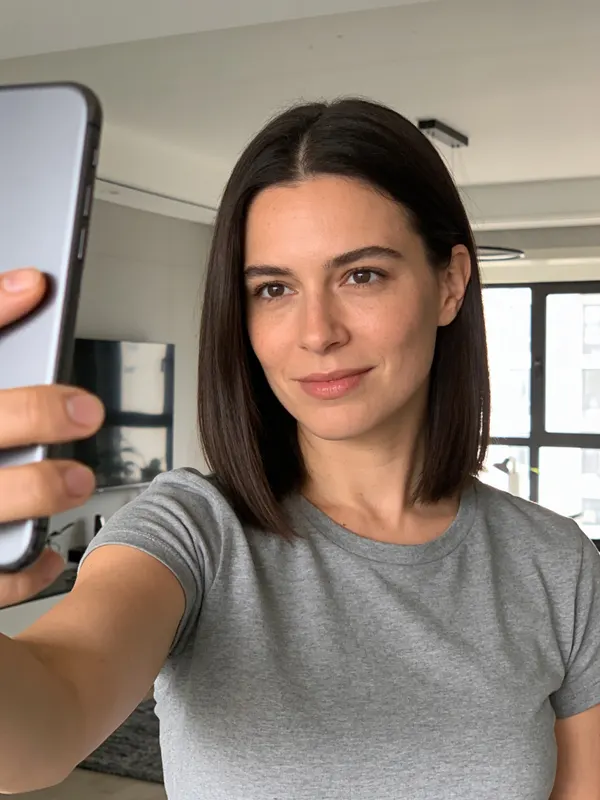
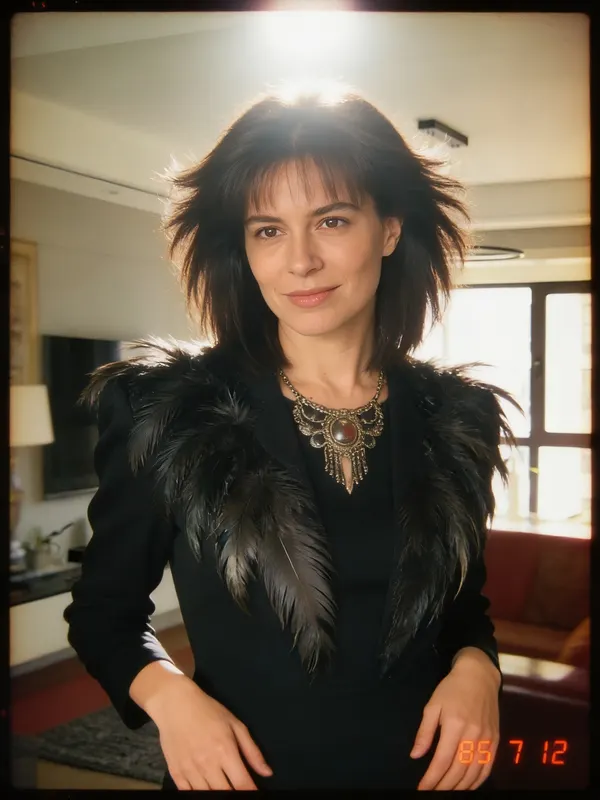
The trend started from a prompt OpenAI shared, and the 1985 snapshot is the one prompt here with runs behind it, though what I ran was longer than this shortened version. If you'd rather not paste anything, the 80s AI photo generator runs the full tested version for you. Quick flag: that's on Leaxor, which is mine. And if you already have the photo and only want it to look old, a vintage photo filter gets you faded film and grain without the model touching your face.
Professional and headshot prompts
LinkedIn headshot
Turn this into a professional corporate headshot. Neutral light grey studio background, soft key lighting, smart business attire, head and shoulders framing, sharp focus on my face.
Founder portrait for a feature
Show me as the subject of a magazine business feature, sitting at a clean desk in a bright modern office, looking at the camera with a relaxed, confident expression. Natural window light from the left. Editorial portrait, muted colours.
On stage as a speaker
Show me speaking on a conference stage, holding a small microphone, mid-sentence and gesturing with one hand, a large blank screen behind me. Stage spotlight on me with a darker audience in the foreground. Event photography, slight motion in my hand.
The headshot prompt is close to the instruction behind my AI headshot generator, if you'd rather upload than paste.
Travel photo prompts
Santorini, golden hour
Show me in a flowing white linen dress on a whitewashed terrace in Santorini, with blue domes and the sea behind me. Low golden-hour sunlight from the side. Relaxed travel photo, natural colours.
Paris café street
Show me sitting at a small round table outside a Paris café, in a trench coat with a coffee in front of me, a cobbled street and Haussmann buildings behind. Overcast soft daylight. Candid street photo, as if taken by a friend across the road.
Mountain viewpoint
Show me in a hiking jacket and backpack at a mountain viewpoint, looking out over a valley with snow-capped peaks, turned partly towards the camera. Clear morning light. Wide travel shot, realistic outdoor colours.
Birthday, graduation and festival prompts
Birthday
Show me at my birthday party, smiling behind a cake with lit candles, balloons and fairy lights behind me, friends blurred in the background. Warm indoor light with the candles glowing on my face. Candid party photo.
Graduation
Show me on graduation day in a black cap and gown, holding a rolled diploma, standing in front of a university building with other graduates blurred behind me. Bright natural daylight. Proud, candid moment.
Diwali at home
Show me in a festive lehenga lighting diyas on a doorstep decorated with a colourful rangoli, on Diwali evening. Warm light from the diyas on my face, soft string lights behind. Low-light photo with natural grain.
Cinematic and everyday prompts
Rainy night street
Show me holding a clear umbrella on a rain-soaked city street at night, neon signs reflecting on the wet road. Neon light in pinks and blues with soft light on my face. Cinematic film still, shallow depth of field.
Golden hour field
Show me in a light summer dress walking through a field of tall grass, looking back over my shoulder. Low warm sunlight behind me with a soft glow around my hair. Film still, gentle haze.
Café window
Show me reading a book at a café window seat, a cup of coffee beside me, rain on the glass. Soft grey daylight from the window. Quiet lifestyle photo, muted tones.
Black and white studio portrait
Show me in a black and white studio portrait against a plain dark backdrop, in a simple black top, looking just off camera. One hard light from the side, deep shadows. Fine-art portrait, high contrast.
Flower market
Show me buying flowers at an outdoor flower market, holding a bunch of sunflowers and laughing, buckets of flowers around me. Bright morning daylight. Candid lifestyle photo.
Gemini AI photo prompts for women: where to paste them
Both work the same way: upload a photo, paste the block and one scene, send. Google describes the Nano Banana model in Gemini as able to change outfits, poses, lighting and scenes while keeping a person's likeness, which is the whole job here. Its prompting tips for Nano Banana Pro suggest naming the subject, composition, action, location and style, and that's the order each scene above follows.
I haven't compared the two apps on these prompts, so I won't pretend to know which keeps your face better. Run your favourite in both.
When it stops looking like you
Change one thing at a time. If you swap the outfit, the location and the lighting in one go and the face drifts, you won't know which change did it.
Start a new chat instead of correcting in the same one. Follow-up edits build on the drifted version, not your original photo.
And check the input. A clear, front-facing, well-lit photo with nothing covering your face does more than any prompt wording. Sunglasses and heavy shadow make your likeness much harder to keep.
If you want prompts for images that don't start from your photo at all, the AI image prompt generator writes them from an idea, and the image generator runs them across forty-six models. For tools that make avatars from a photo without any prompt, I compared them in the best AI avatar generators from a photo.
Frequently asked questions
How do I use these AI photo prompts?+
Open Gemini or ChatGPT and upload a clear photo of yourself. Press Copy prompt on any card, which copies the face-keeping block and the scene together, then paste it as one message. If the result drifts, start a new chat rather than asking for corrections in the same one, and change one thing in the prompt at a time.
Are these AI photo prompts free to use?+
Yes. Copy them, change them, use them anywhere. Whether generating the image is free depends on the app. Gemini and ChatGPT both have free usage with daily limits that change often, so check the current limits in the app.
Which is better for AI photo editing, Gemini or ChatGPT?+
I haven't run these prompts side by side in both, so I won't pick a winner. Google describes its Nano Banana model in Gemini as built to keep a consistent likeness while changing outfits, poses, lighting and scenes, which is exactly this job. Try the same photo and prompt in both and keep whichever keeps your face better.
Why doesn't the AI photo look like me?+
The most common causes are a weak input photo and a prompt that changes too much at once. Use a well-lit, front-facing photo without sunglasses. Put the face-keeping block first, since earlier instructions carry more weight, and include the line telling it not to smooth or beautify your skin.
What is the best AI photo prompt for a saree look?+
Name the fabric, colour and draping, add jewellery, and give it a setting and a light source. 'Saree' on its own gives a generic result. The three saree prompts in this post each specify all of those, and each starts with the face-keeping block.
Can I make a 1985-style photo without writing a prompt?+
Yes. Leaxor's 80s AI photo generator runs the tested version of the 1985 prompt for you. Upload a selfie and it returns the photo. The first 3 photos are free with an account, then each costs 2 credits ($0.20).
Skip the prompt for the 1985 look
Upload a selfie and the 80s AI photo generator runs the full tested prompt. Your first 3 photos are free with an account, then 1 credit each.
Try the 80s photo generatorYuvraj SinghFounder, Leaxor
Built Leaxor, an all-in-one AI image and video generator, to kill the two bottlenecks in publishing: 3–5 hours per short, and a second tool for every thumbnail. Now both take minutes.